Sandboxing for YOLO Safety
TL;DR summary: Docker Sandboxes are a convenient and effective means of safely running a coding harness in permissions bypass mode.
YOLO is now (dangerously so) the norm
Running coding harnesses in YOLO (bypass permissions) mode has become the new norm:
- Configuring the right permissions is "hard" (read: tedious), especially when you throw in git worktrees that cause compound commands (
cd <worktree> && <take an action>). - Approving permissions demands attention: it is stultifying and ruins much of the benefit of using a coding agent - letting it run while you go do something else.
In YOLO mode, the coding harnesses in summer 2026 seem to be very good at preventing the agents from reaching files outside the code repository; in all of 2026 I do not think I have denied permission to anything, and my spot-checking of the logs revealed nothing concerning.
Then again, they might just be very good at hiding their tracks... see recent news about agents "escaping" to crack into other companies.
Probing the limits of permissions and worktrees
Assume for a moment that the agent won't do anything to trash your computer. What about production systems? Across dozens of repositories, I have two .env files with production system information. Attempting to deny access to read those files is tricky, at least with Claude Code: the system can often find a way using indirect access through an approved rule. For example, denying "Read(./.env.*)" will work, but will that prevent it from calling cat .env from a Bash command? And did you remember to restore access to a file like .env.example so that the agent can insert new environment variables?
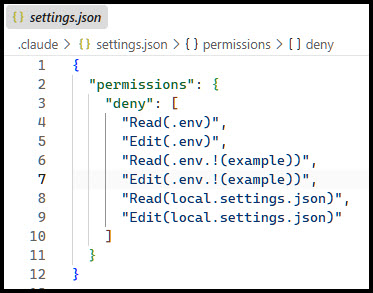
Running the agent on a git worktree will help: the worktree won't have the environment files. But what about environment variables? Or signed-in tools? Do you want the tool to run your cloud provider's CLI tool on your behalf to check on production settings?
Getting smart
I have a personal project, building a web application for volunteer management. The deployment is set up on Azure. A few weeks ago, I tasked Claude Code with inspecting deployment scripts to try to diagnose and correct a production error.
Guiltily, I recognized my guard was down: were there previous occasions in which Claude Code, in bypass mode, was accessing my Azure subscription without adequate safeguards? That was a wake up call.
Requirements
Goal: select an approach for safely running in YOLO mode, satisfying this non-exhaustive list of requirements:
- Run in Windows and/or WSL
- Allow network access
- No access to my filesystem or Windows operations, other than the code repository I am working in
- No access to environment variables
- Works for multiple coding harness - in particular, Claude Code and GitHub Copilot
- Must be able to install dev tools, such as Node.js and the .NET SDK
- Can connect to GitHub for read/write access to pull requests
- "Easy" to manage, with low impact on the operating environment
A quick survey of solutions
Simplistic thinking: git worktree and WSL. Let's test that theory:
$ az account list
[
  {
    "cloudName": "AzureCloud",
    "homeTenantId": "*****",
    "id": "*****",
    "isDefault": true,
    "name": "*****",
    "state": "Enabled",
    "tenantDefaultDomain": "*****.onmicrosoft.com",
    "tenantDisplayName": "Default Directory",
    "tenantId": ""*****",
    "user": {
      "name": "*****",
      "type": "user"
    }
  }
]
Nope, az is accessing the same session authentication as seen from Windows (outside of WSL).
Next: Claude Code has a number of ideas for sandboxing.
| Approach | Meets Requirements |
|---|---|
| Sandboxed Bash | ❌ no - Claude specific |
| Sandbox runtime | ❌ no - Claude specific |
| Dev container | ✅ looks intriguing |
| Custom container | ✅ let's try this |
| Virtual machine | ❌ no - too intensive |
| Claude Code on the web | ⚠️ yes - but see below |
Assigning work to Claude Code on the web, or GitHub Copilot Coding Agent, can be a productive and safe experience. In fact, I delegate most final implementations to remote agents. But I prefer doing my planning locally; my planning artifacts are often at the wrong level of detail for long-term storage, so I prefer never to add them to the repository, as would occur if working only online.
The repository should have requirements (PRD) and architectural designs (ADRs and related documents), not low-level or interim implementation planning documents. The implementation plan that derives from a planning session is what I hand off to the remote agent.
What about dev containers? Has promise, but I've yet to use a dev container in any setting: there will be a learning curve. Not rejected, but not yet ready to commit to it.
And custom containers? I am very used to those. To jumpstart, a search: "use docker as a sandbox for claude code".
Oh! Docker Sandboxes are a thing. A product. Pre-configured and free. What's the catch? You must sign-in; corporate governance tools are available but require a paid account. Out of the box, it meets all requirements, though #5 (Must be able to install dev tools) will require a little effort. Why build my own custom container when I can use this product?
Solution
Two weeks later: I won't say this is the best solution. Having passed on trying out other options, that claim would be disingenuous. But it is working for me.
As a regular Docker user, the command line interface is familiar and easy to learn. The containers run with a small footprint micro VM architecture, and the solution is completely separate from Docker Desktop (which is not required).
At last, I feel that I'm practicing safe permission bypass. That is, assuming the agent doesn't do anything crazy with my GitHub token 😉.
Tips
-
Plan to create and use a GitHub token with minimal permissions required to get the job done.
-
git clone mode is the safer option instead of directly mounting the directory; otherwise the sandbox will have access to local environment files. Clone mode is not the same as a worktree, but accomplishes the same goal.
-
The runtime environment can be customized with a Dockerfile-based template; for example, I have a template called sandboxes-with-pwsh-and-dotnet. Drawback that I can live with: To get the latest versions I will need to remember to rebuild the image from time to time.
Example command, running in clone mode with a custom template:
sbx run claude --clone --template stephenfuqua/sbx-claude-pwsh-dotnet -
Plan to have a separate sandbox instance for every repository. While it is possible to mount multiple repositories into a sandbox, the session will always default to the first mounted directory; switching to another is tedious. Even after switching directories, you risk the agent reading files from the original repository by mistake.
Separate sandbox containers for each harness, spanning dozens of repositories, could eventually eat a lot of disk space. Will need to keep an eye on that going forward.
-
If you have already customized local settings, copy them in to the sandbox. Example: copy my Claude settings file and a custom script for the status line into a sandbox that was created with
--name claude-pilot(note to self: add this as a layer in my Dockerfile template):sbx cp C:\Users\<username>\.claude\settings.json claude-pilot:/home/agent/.claudesbx cp C:\Users\<username>\.claude\statusline-command.sh claude-pilot:/home/agent/.claude
Postscript: Future Direction
While this is working well, eventually I may get frustrated at some quirks to this approach. Perhaps I will come around to building my own container containing the compiler / runtime tools I need, along with both coding harnesses that I actively use. Which starts to sound a lot like a devcontainer...
Postscript 2026-09-26: Unable to use Copilot
When I got around to trying Copilot in a Docker Sandbox, I was disappointed to find that it unusable. The following error displays when trying to select a model, and I am unable to find any additional information about this:
Error loading model list: Error: 400 "checking third-party user token: bad request: Personal Access Tokens are not supported for this endpoint\n
As of June, 2026, Copilot does have its own sandbox mode, but for Windows users it requires running a Windows Insiders build.
Postscript 2026-10-16: Resolving the Copilot Error
I posted the copilot problem as issue 368 in the source repository. Then with a little help from Claude I found the fix. See the issue and its pull requests for more information. Copilot is now working in the sandbox on my machine.
This blog post was handcrafted and conceived, with minor only minor updates from Copilot Review Agent and a Claude Code + Sonnet 5 editorial review.